
Website traffic rarely follows a predictable pattern. An online store may receive hundreds of visitors on a normal day and thousands during a promotional campaign. When traffic increases unexpectedly, server resources can become insufficient, resulting in slow loading times, delayed database queries, and interrupted customer transactions.
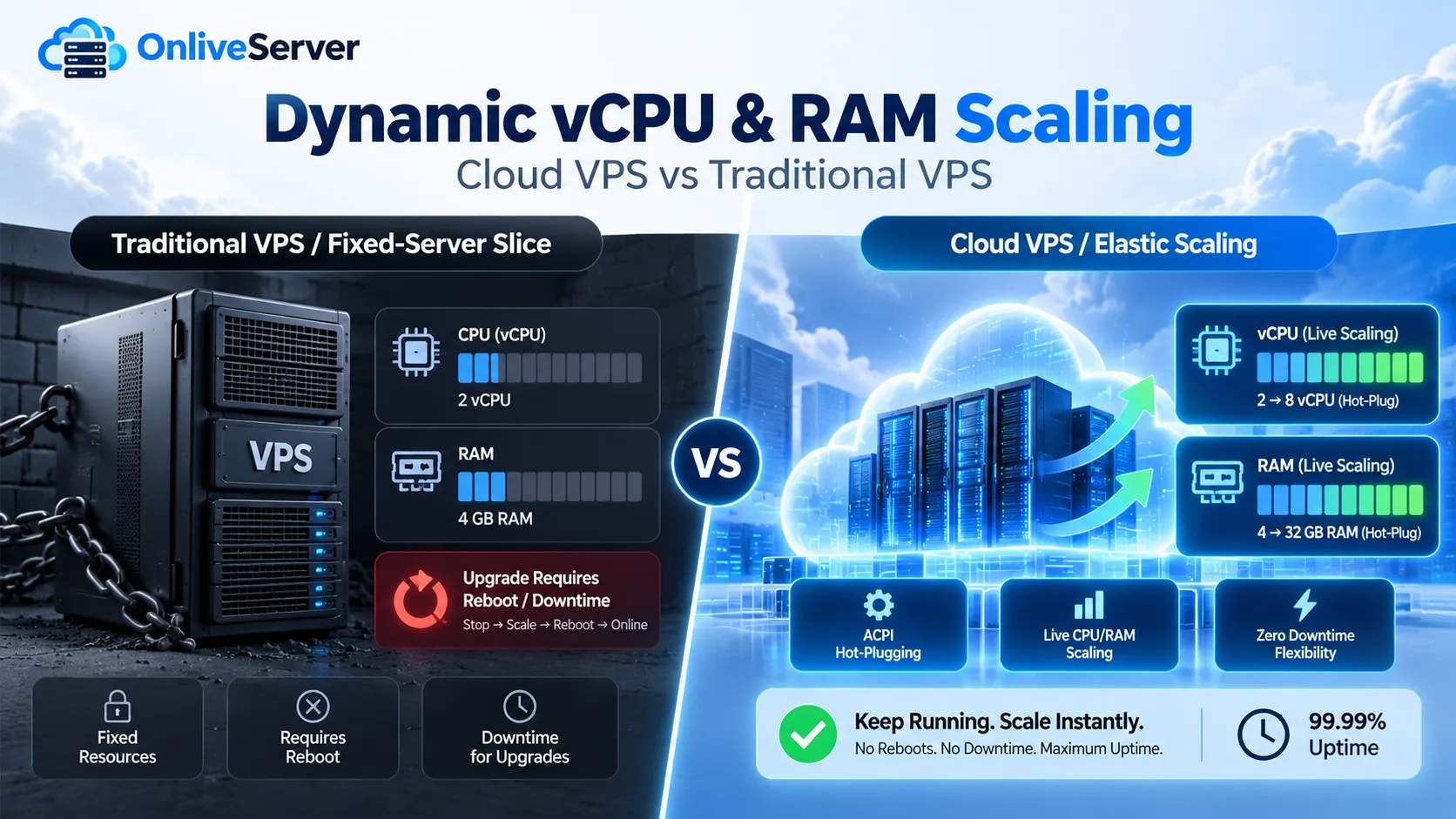
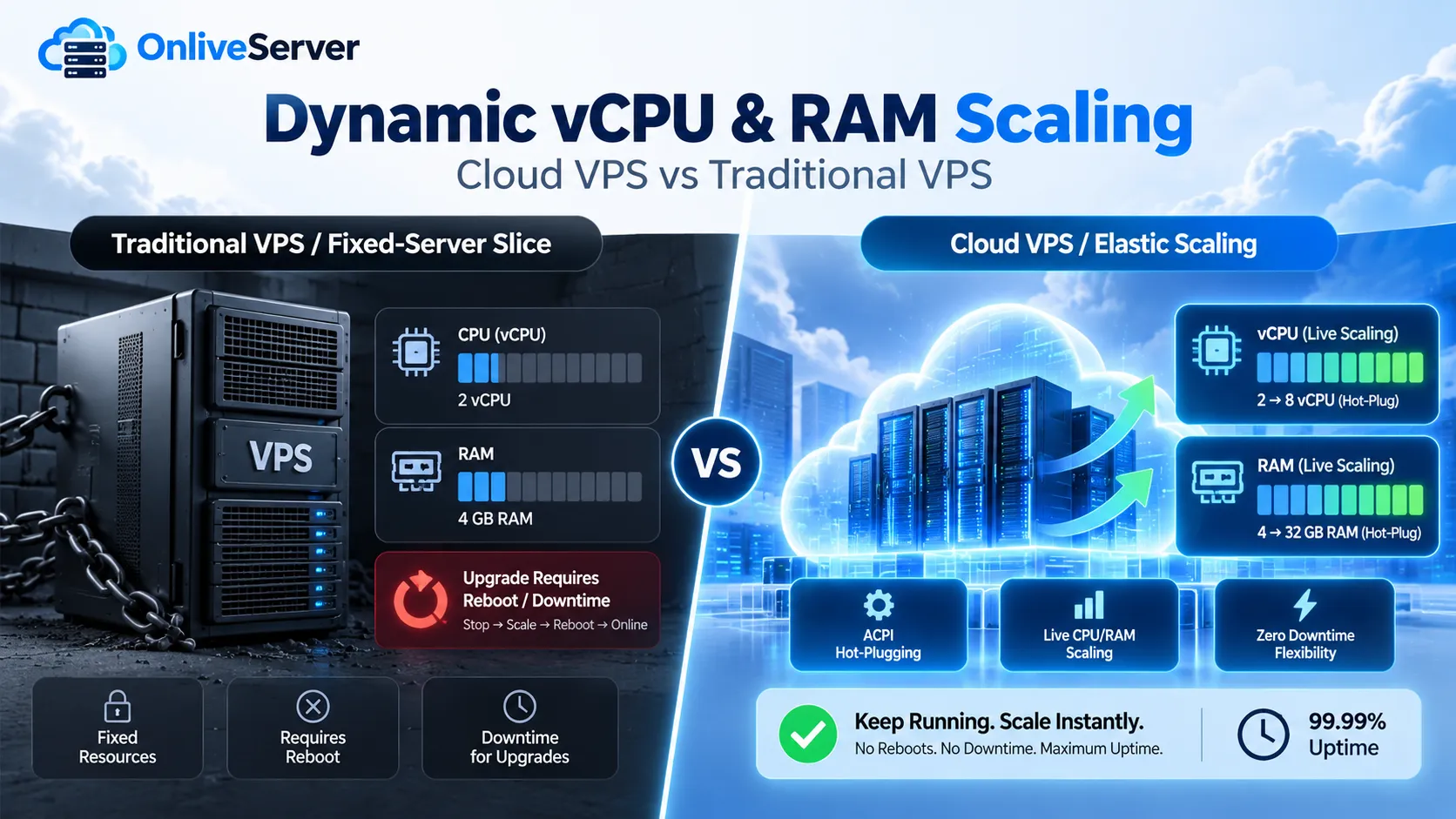
Traditional VPS hosting often requires a restart when upgrading CPU or RAM. Cloud VPS infrastructure can offer greater flexibility through dynamic resource allocation, allowing compatible virtual machines to receive additional resources without shutting down.
Technologies such as ACPI hot-plugging, VirtIO ballooning, and Linux kernel memory management make this possible under supported configurations. For businesses considering a cheap cloud vps, understanding these technologies helps determine whether a hosting plan can accommodate changing workloads without unnecessary service interruptions.
Why Traditional VPS Resource Upgrades Often Require Reboots
Traditional Virtual Private Server hosting divides a physical server into multiple isolated virtual machines. Each VPS receives a predefined allocation of CPU cores, RAM, storage, and network capacity.
For example, a website hosted on a VPS with two vCPU cores and 4 GB of RAM may eventually need additional resources as visitor activity grows. In hosting environments without live resource adjustment capabilities, increasing those allocations requires modifying the virtual machine configuration and restarting the operating system.
This creates temporary downtime, which can affect websites processing payments, handling customer sessions, or running time-sensitive applications.
Traditional VPS technology is not inherently incompatible with live scaling. Some KVM-based environments support CPU and memory hot-plugging. The difference depends on the hosting provider's configuration, virtualization platform, and available infrastructure features.
How Dynamic Resource Scaling Works in Cloud VPS
Dynamic resource scaling allows compatible cloud infrastructure to modify virtual machine resources while the guest operating system remains active.
A hypervisor manages the relationship between physical hardware and virtual machines. When additional processing capacity is assigned, it can expose new virtual CPUs to the running operating system. Similarly, supported memory expansion mechanisms can introduce additional RAM capacity.
The Linux kernel recognizes these changes and makes the new resources available when the required drivers and configurations support the operation.
For businesses running applications with unpredictable resource requirements, this flexibility can reduce the need for scheduled restarts during certain upgrades.
Cloud VPS scaling is still limited by physical hardware capacity, configured virtual machine maximums, and provider policies. Simply using cloud infrastructure does not guarantee unlimited or uninterrupted resource expansion.
Understanding ACPI Hot-Plugging for Virtual CPU Scaling
Advanced Configuration and Power Interface, or ACPI, provides mechanisms that allow operating systems to communicate with hardware and firmware about device configuration and power management.
In supported virtualized environments, ACPI CPU hot-plugging allows additional virtual processors to become available while the operating system continues running.
Suppose an e-commerce website initially operates with two vCPU cores. A promotional campaign increases application requests and CPU utilization. If the hypervisor supports CPU hot-plugging, the server may be expanded to four vCPU cores without rebooting.
Once Linux recognizes and activates the additional processors, its scheduler can distribute suitable workloads across the expanded CPU capacity.
This capability is useful for applications handling concurrent requests, background processing, and resource-intensive operations.
CPU expansion may still be restricted by the maximum virtual processor configuration established when the virtual machine starts. Changes beyond those limits can require a reboot.
Linux Memory Hot-Plugging and Dynamic RAM Expansion
Memory hot-plugging allows additional memory capacity to be introduced into a running Linux operating system.
When the hypervisor attaches supported virtual memory, the Linux kernel detects the new memory blocks. Those blocks must be brought online before applications can use the additional RAM.
Consider an online store operating with 4 GB of RAM. During a seasonal sales event, increased database activity, application workers, and customer sessions may create additional memory pressure.
If the hosting platform supports memory hot-plugging, the virtual machine may be expanded to 8 GB without restarting the operating system, provided sufficient capacity is available.
The additional memory can help accommodate application workloads and database caching. Some services may still require configuration changes to use the expanded capacity effectively.
Memory hot-plugging is particularly useful for production websites where scheduled restarts can interrupt active customer activity.
How VirtIO Ballooning Supports Cloud Memory Management
VirtIO ballooning is a virtualization technology that helps hypervisors adjust how much memory remains available to a guest operating system.
A balloon driver runs inside the virtual machine and communicates with the hypervisor. When memory needs to be reclaimed, the driver reserves selected guest memory pages, allowing the host to recover their backing memory.
When the balloon deflates, those pages become available to the guest again.
This mechanism helps virtualization platforms manage memory utilization across multiple virtual machines.
VirtIO ballooning should not be confused with memory hot-plugging. Ballooning primarily adjusts usable memory within an existing configured arrangement, while memory hot-plugging introduces additional memory capacity.
Another mechanism, virtio-mem, supports more flexible dynamic memory allocation in compatible virtualization environments.
These technologies improve resource management, but their availability and capabilities depend on the virtualization platform and guest operating system.
Cloud VPS vs Traditional VPS: Resource Scaling Differences
The main difference between Cloud VPS and traditional VPS hosting lies in how resources are provisioned and managed.
Traditional VPS plans commonly provide fixed resource packages. Customers upgrading CPU or RAM may need to restart their virtual machines or move to another hosting configuration.
Cloud VPS environments may support centralized resource management and live CPU or memory adjustments, allowing compatible instances to expand without planned downtime.
Businesses should examine Cloud VPS vs Traditional VPS performance and reliability when evaluating hosting infrastructure for growing applications.
Both environments can use similar hypervisor technologies, and both may support resource hot-plugging. What matters is whether the provider enables those capabilities for the selected hosting plan.
Cloud clustering and virtual machine migration may offer additional infrastructure flexibility, but neither automatically guarantees reboot-free resource upgrades.
Why Reboot-Free Scaling Matters for E-Commerce Businesses
E-commerce websites often experience sudden traffic increases during product launches, holiday sales, and marketing campaigns.
More visitors generate additional application requests, database operations, and checkout activity. If CPU or memory resources become insufficient, website performance can deteriorate when customers are attempting to complete purchases.
Dynamic resource scaling can help administrators respond to increased demand without introducing a planned server shutdown.
For Philippine online merchants and other Southeast Asian businesses, this flexibility is valuable during regional shopping campaigns and time-sensitive promotions.
A WooCommerce store, for example, may benefit from additional CPU capacity when simultaneous checkout requests increase. Extra memory may also support application workers and database caching.
Resource scaling does not resolve every performance problem. Inefficient plugins, slow database queries, and application configuration limits may still require optimization.
Cost Efficiency and Flexible Cloud VPS Resources
Businesses often select VPS hosting based on monthly pricing, but resource flexibility can also influence long-term expenses.
A website may require substantial computing capacity during occasional traffic spikes while using considerably fewer resources during normal operations.
Cloud platforms that support flexible provisioning can allow businesses to expand resources, when necessary, instead of maintaining an oversized server throughout the year.
A cheap cloud vps can provide an affordable starting point for websites expecting gradual growth or fluctuating workloads.
Actual savings depend on the provider's billing structure. Some platforms charge according to allocated resources, while others use fixed packages.
Scaling down may also require restarting the virtual machine, even when scaling up is possible without interruption.
Businesses should review resource adjustment policies and billing conditions before assuming that elastic hosting automatically reduces costs.
Ubuntu 24.04 and AlmaLinux 9 Compatibility
Ubuntu 24.04 LTS and AlmaLinux 9 use Linux kernel families that include relevant CPU and memory hot-plug capabilities.
However, live resource scaling depends on specific kernel builds, virtualization drivers, guest configurations, and hypervisor support.
For CPU expansion, the operating system must detect and activate additional virtual processors. For memory expansion, newly introduced memory blocks must become available to the kernel.
The presence of Linux hot-plug support does not mean every VPS running these distributions can expand without restarting.
Administrators should confirm compatibility with their hosting provider and test resource changes before relying on them in production.
Physical Hardware Limitations and Scaling Considerations
Cloud infrastructure cannot provide unlimited resources. Every virtual machine depends on physical processors, memory, storage, and network capacity.
If a physical host lacks available RAM or processing capacity, additional allocations may become restricted.
Cloud clusters can improve workload placement options, and compatible virtual machines may be migrated between physical hosts when infrastructure conditions require it.
Migration is separate from hot-plugging and has its own operational requirements.
Adding CPU cores also does not guarantee proportional performance improvements. Application design, storage performance, and CPU scheduling affect actual results.
Effective scaling requires server monitoring, capacity planning, and an understanding of infrastructure limits.
Choosing a Cloud VPS for Growing Applications
Selecting a hosting platform involves more than comparing RAM, CPU cores, and monthly prices.
Businesses should examine how resource upgrades are performed, whether live scaling is supported, and how changes affect existing applications.
Websites with stable workloads may perform well on fixed-resource VPS plans. Applications with unpredictable demand may benefit from cloud environments offering flexible provisioning.
Onlive Server provides VPS hosting options for businesses evaluating hosting expenses, infrastructure requirements, and future growth. Customers should verify the live-scaling capabilities, supported operating systems, and upgrade policies of their selected plan.
The right VPS should provide sufficient resources, predictable costs, and practical options for handling future workload increases.
Conclusion
Dynamic vCPU and RAM allocation can improve Cloud VPS flexibility by allowing compatible virtual machines to receive additional computing resources without restarting.
ACPI hot-plugging, Linux memory management, VirtIO ballooning, and virtio-mem support different aspects of virtual resource allocation. Their capabilities depend on the hypervisor, operating system, and available hardware.
Traditional VPS platforms may also support live scaling, so reboot-free upgrades are not exclusive to cloud hosting.
For e-commerce websites and growing business applications, dynamic scaling can reduce planned interruptions during supported resource upgrades. Choosing a Cloud VPS should therefore involve checking actual scaling capabilities, infrastructure limits, and provider policies rather than relying solely on advertised specifications or pricing.
Responses (0)
Join the conversation
Sign in to share your thoughts and talk with the author.
Sign in to respondNo responses yet. Be the first to share your thoughts!