
A moving title looks uneven during an HDMI rehearsal. Before changing the player or display, check whether the source clip is already presenting frames at uneven intervals. An average frame rate can hide one long gap surrounded by short ones.
Export timestamps for the first video stream
Run this on a short local clip. Save the JSON so you can compare the same file on a laptop and through the HDMI chain.
ffprobe -v error -select_streams v:0 -show_frames -show_entries frame=best_effort_timestamp_time -of json clip.mp4 > frames.json
node cadence.mjs < frames.json
If your shell does not support input redirection, run those two commands in Bash or Command Prompt. The timestamp field is reported in seconds. The script converts it to microseconds and compares adjacent frames in the order reported. It stops on a missing, duplicate, or backward timestamp so an incomplete or reordered sequence cannot quietly produce a reassuring result.
Save this as cadence.mjs
import { readFileSync } from 'node:fs';
function toMicroseconds(timestamp) {
if (typeof timestamp !== 'string' || !/^-?\d+(?:\.\d{1,6})?$/.test(timestamp)) {
throw new Error('A frame has no usable presentation timestamp.');
}
const value = Math.round(Number(timestamp) * 1_000_000);
if (!Number.isSafeInteger(value)) {
throw new Error('A presentation timestamp is outside the safe range.');
}
return value;
}
export function checkCadence(probe) {
if (!Array.isArray(probe.frames) || probe.frames.length < 5) {
throw new Error('Provide at least five decoded video frames.');
}
const times = probe.frames.map(frame => toMicroseconds(frame?.best_effort_timestamp_time));
const intervals = times.slice(1).map((time, index) => time - times[index]);
if (intervals.some(interval => interval <= 0 || !Number.isSafeInteger(interval))) {
throw new Error('The reported presentation times must increase.');
}
const limits = intervals.reduce(
({ shortest, longest }, interval) => ({
shortest: Math.min(shortest, interval),
longest: Math.max(longest, interval),
}),
{ shortest: Infinity, longest: 0 },
);
const spreadUs = limits.longest - limits.shortest;
return {
frames: times.length,
shortestMs: limits.shortest / 1000,
longestMs: limits.longest / 1000,
unevenOverHalfMs: spreadUs > 500,
};
}
try {
console.log(JSON.stringify(checkCadence(JSON.parse(readFileSync(0, 'utf8'))), null, 2));
} catch (error) {
console.error(error.message);
process.exitCode = 1;
}
Compare two short examples
Feed the script an object with a frames array. Each item should look like {"best_effort_timestamp_time":"0.040000"}.
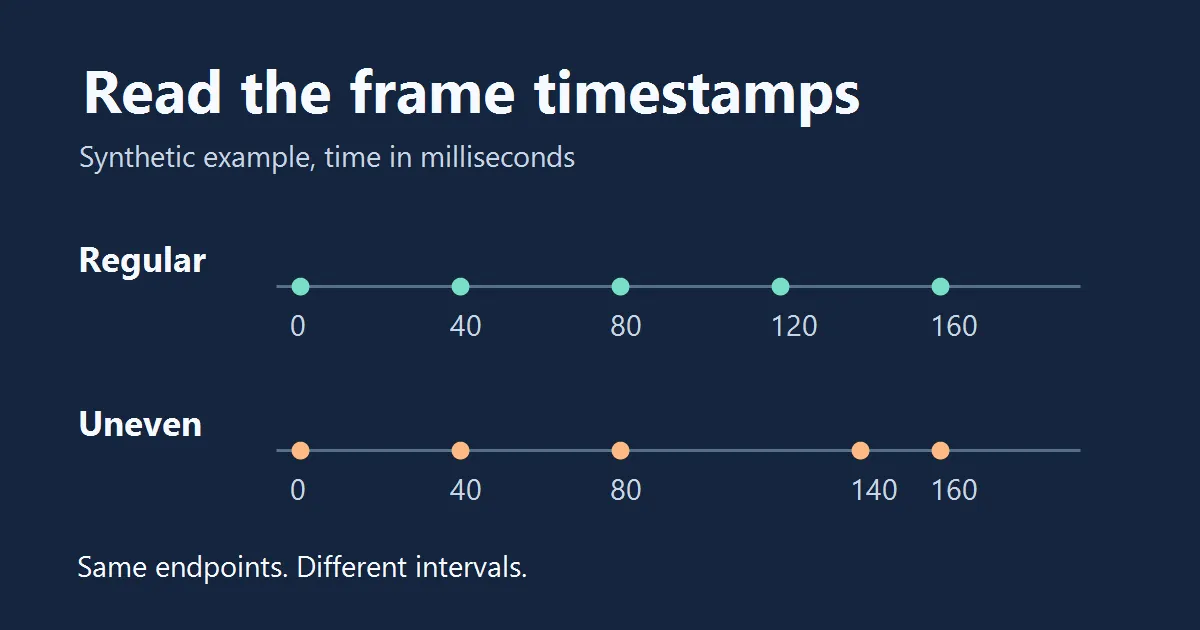
Regular: 0.000, 0.040, 0.080, 0.120, 0.160 seconds. Shortest interval 40 ms, longest 40 ms, uneven over 0.5 ms: false.
Uneven: 0.000, 0.040, 0.080, 0.140, 0.160 seconds. Shortest interval 20 ms, longest 60 ms, uneven over 0.5 ms: true.
The half-millisecond cutoff is a screening choice for this exercise. A coarse time base can produce alternating timestamps around an otherwise regular cadence. Check the stream time base and a longer section before calling a file variable-rate. A flagged clip can still play smoothly, and a regular file can still judder when the playback refresh rate and frame cadence differ.
Compare laptop playback and HDMI playback
1. Replay the same motion twice on the laptop using the same file and player. Check whether the hitch returns at the same point.
2. Play the file through HDMI. If the laptop looks smooth, record the output refresh rate and change only one playback setting at a time. The Alidel HDMI startup guide below shows how to select the HDMI source on an X500 and compare the laptop output with the projector.
3. Save the shortest and longest intervals alongside the playback notes. This gives the next person both a file-level observation and an easy way to reproduce the display comparison.
The examples use synthetic timestamps and were checked locally. The projector procedure is a reproducible check, with no hardware measurements reported here. An AI assistant helped draft the text and code.
The ffprobe reference below documents the available options and output fields.
Responses (0)
Join the conversation
Sign in to share your thoughts and talk with the author.
Sign in to respondNo responses yet. Be the first to share your thoughts!