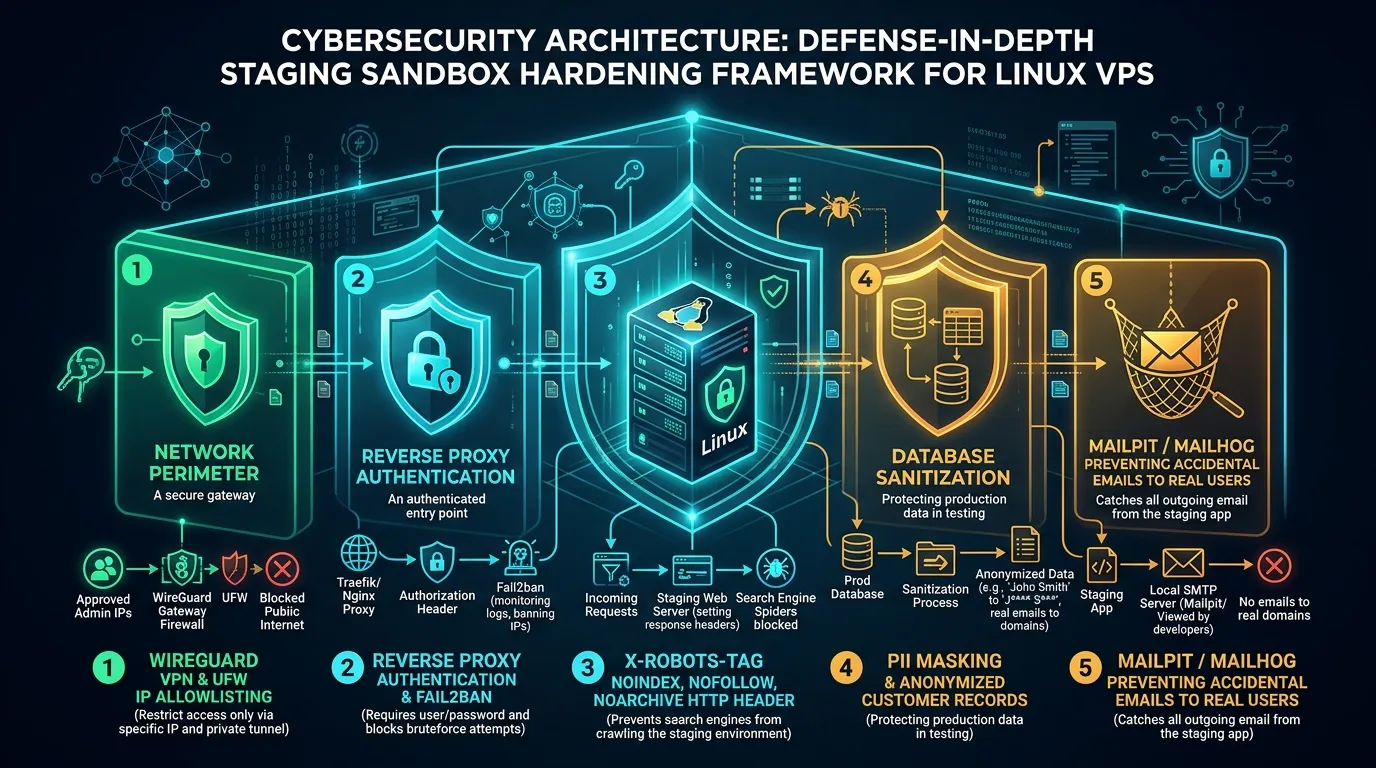

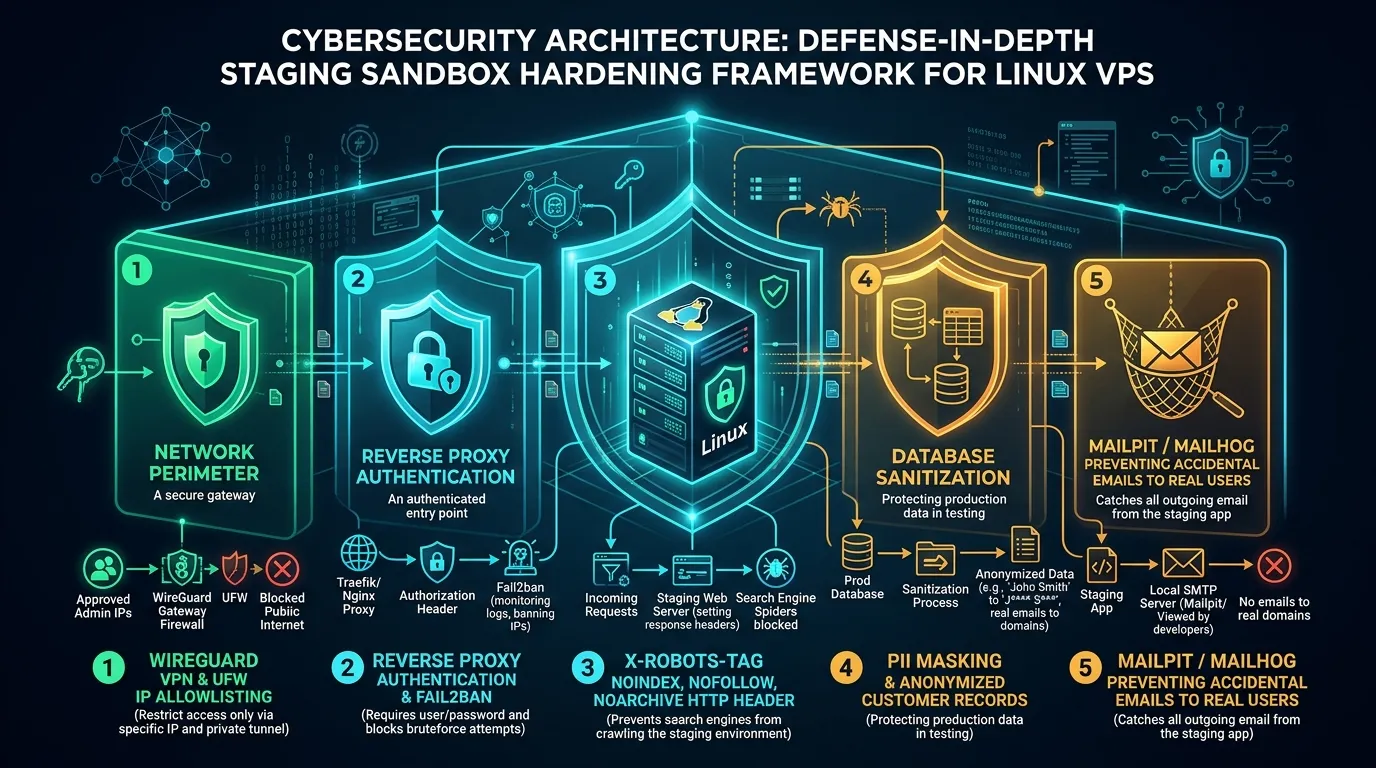
A staging server allows developers to test website changes, new features, and application updates before deploying them to production. It is useful for checking database migrations, debugging applications, and reviewing changes without affecting real users.
The problem is that staging environments are sometimes configured with fewer security restrictions than production servers.
A publicly accessible staging website may expose application errors, test accounts, database information, or internal features. Search engines may also discover staging URLs and display them in search results.
Securing a staging environment requires more than adding a password or blocking search crawlers. Administrators need to control access, protect sensitive data, restrict network traffic, and prevent testing systems from interacting with real customers.
This guide explains how to secure a Linux VPS staging environment using Nginx, Caddy, firewall rules, database anonymization, and Mailpit.
Why Staging Environment Security Matters
Staging environments often contain development versions of websites and applications. They may use different software configurations, debugging tools, or test databases.
These environments can introduce several risks if they are accessible without proper protection.
- Unauthorized access: Visitors may discover internal features, application endpoints, or debugging information.
- Sensitive data exposure: Copying a production database into staging without removing personal information can expose customer records.
- Unwanted search indexing: Search engines may discover staging pages that were never intended to appear publicly.
- Accidental emails: Applications using production SMTP credentials may send test messages to real customers.
- Security vulnerabilities: Outdated dependencies, exposed administrative services, and debugging features can increase the attack surface.
The safest approach is to treat staging as a separate environment with its own access controls, credentials, and data policies.
1. Prevent Google from Indexing Staging Pages
One common approach to hiding staging websites is adding the following rule to robots.txt:
User-agent: *
Disallow: /
This tells compliant search crawlers not to crawl the website.
The limitation is that blocking crawling does not necessarily prevent a URL from appearing in search results. Search engines may still discover the address through external links.
A staging URL could therefore appear in search results even when its content has not been crawled.
Use the X-Robots-Tag Header
For pages that search engines can access, an HTTP response header can provide an indexing directive.
Example:
X-Robots-Tag: noindex, nofollow
The noindex directive tells search engines that support it not to include the page in their search results.
Search engines must be able to access the response to detect this instruction. If the page is blocked by robots.txt, the crawler may never see the header.
Removing an already indexed URL can also take time.
For private staging websites, password protection or network access restrictions provide stronger protection than crawler directives.
Important: A noindex header does not protect confidential information. Anyone who can access an unprotected staging website may still be able to view its content.
2. Protect Staging Access with Nginx
Nginx is commonly used as a reverse proxy for Linux applications. It can require authentication before forwarding requests to a staging service.
For example, consider a staging application running locally on port 3000.
A Nginx HTTPS configuration could include:
server {
listen 443 ssl;
server_name staging.example.com;
ssl_certificate /etc/letsencrypt/live/staging.example.com/fullchain.pem;
ssl_certificate_key /etc/letsencrypt/live/staging.example.com/privkey.pem;
add_header X-Robots-Tag "noindex, nofollow" always;
add_header X-Content-Type-Options "nosniff" always;
auth_basic "Restricted Staging Environment";
auth_basic_user_file /etc/nginx/.htpasswd_staging;
location / {
proxy_pass http://127.0.0.1:3000;
proxy_set_header Host $host;
proxy_set_header X-Real-IP $remote_addr;
proxy_set_header X-Forwarded-For $proxy_add_x_forwarded_for;
proxy_set_header X-Forwarded-Proto $scheme;
}
}
This example assumes that the domain, HTTPS certificates, and upstream application are already configured.
It requires a username and password before allowing visitors to access the application.
The always parameter tells Nginx to include the specified response headers even on error responses.
Create Authentication Credentials
On Ubuntu or Debian, install the required utility:
sudo apt update
sudo apt install apache2-utils
Create the authentication file:
sudo htpasswd -B -C 12 -c /etc/nginx/.htpasswd_staging stagingadmin
You will be prompted to create a password.
Restrict access to the file:
sudo chown root:www-data /etc/nginx/.htpasswd_staging
sudo chmod 640 /etc/nginx/.htpasswd_staging
Before applying the Nginx configuration, test it:
sudo nginx -t
If the configuration test succeeds, reload Nginx:
sudo systemctl reload nginx
Users visiting the protected staging website should receive an authentication prompt.
Use HTTPS whenever HTTP Basic Authentication is enabled because Basic Authentication does not encrypt credentials on its own.
Avoid creating publicly accessible exceptions for deployment webhooks unless those endpoints have independently verified authentication and appropriate request validation.
3. Secure Staging Applications with Caddy
Caddy is another web server and reverse proxy that supports HTTPS and access controls.
For administrators using Caddy instead of Nginx, staging authentication can be configured in a Caddyfile.
First, generate a password hash:
caddy hash-password
The command prompts for a password and returns a hash.
For Caddy versions supporting the basic_auth directive, the configuration can look like this:
staging.example.com {
basic_auth {
stagingadmin YOUR_GENERATED_PASSWORD_HASH
}
header {
X-Robots-Tag "noindex, nofollow"
X-Content-Type-Options "nosniff"
}
reverse_proxy 127.0.0.1:3000
}
Replace the placeholder with the actual generated password hash.
This configuration assumes the application is listening on port 3000 and the domain resolves correctly.
Caddy can manage HTTPS certificates automatically when the domain and network configuration meet its requirements.
After updating the Caddyfile, validate the configuration before reloading the service.
sudo caddy validate --config /etc/caddy/Caddyfile
sudo systemctl reload caddy
Nginx and Caddy provide similar protection options. Administrators can choose whichever fits their existing server configuration.
4. Restrict Network Access with a Firewall
Application authentication is important, but restricting network access adds another layer of protection.
A staging server may only need to be accessible to developers, testers, and selected project stakeholders.
On Ubuntu, UFW can be used to control incoming connections.
For example, an administrator can allow SSH access from a trusted IP address:
sudo ufw allow from 198.51.100.25 to any port 22 proto tcp
To restrict HTTPS access to an approved office network:
sudo ufw allow from 198.51.100.0/24 to any port 443 proto tcp
The addresses shown here are documentation examples. Replace them with actual trusted addresses.
Before enabling restrictive firewall rules, confirm that SSH access is allowed from your current administrative network.
Incorrect firewall settings can lock administrators out of remote servers.
For distributed teams without fixed public IP addresses, a private VPN such as WireGuard may be more practical.
With a VPN-based approach, staging services can be restricted to authenticated team members rather than exposed directly to the internet.
5. Protect Customer Data in Staging Databases
Database privacy is one of the most important parts of staging environment security.
Development teams sometimes restore a production database into staging to reproduce bugs or test application behavior.
This may introduce real customer names, email addresses, phone numbers, addresses, authentication information, and payment-related records into a less restricted environment.
Staging systems should use synthetic or properly anonymized data whenever possible.
Use Test Data Instead of Real Customer Records
For example, a staging database can contain fictional customer information:
Customer ID: 1001
Name: Test Customer
Email: [email protected]
Phone: Synthetic test value
This allows developers to test forms, account features, and database queries without exposing real individuals.
If production data must be used for debugging, anonymization should be performed through a controlled process before the data becomes accessible in staging.
The process should consider direct identifiers, indirect identifiers, free-text fields, file attachments, application logs, and relationships between database records.
Simply changing email addresses is not enough if other fields can still identify customers.
Avoid applying generic SQL scripts to a live database. Database structures vary, and destructive commands may remove information or break application relationships.
Use database-specific sanitization procedures, maintain recoverable backups, and verify the resulting dataset before developers access it.
Separate Production and Staging Credentials
Staging should have its own:
- Database accounts and passwords.
- Application secrets and encryption keys.
- API credentials and service tokens.
- Payment gateway test credentials.
- Administrative accounts and access policies.
Production credentials should not be copied into development configuration files.
This separation helps reduce the impact of a staging system compromise.
6. Prevent Accidental Emails with Mailpit
Staging applications often generate emails during testing.
Examples include account registration messages, password reset links, order confirmations, and notification emails.
If staging uses production SMTP credentials, these messages may reach real customers.
Mailpit is an email testing tool that captures messages locally instead of delivering them to their intended recipients.
<i>Run Mailpit with Docker Compose</i>
A basic Docker Compose configuration is:
services:
mailpit:
image: axllent/mailpit:latest
restart: unless-stopped
ports:
- "127.0.0.1:1025:1025"
- "127.0.0.1:8025:8025"
This configuration binds Mailpit's SMTP and web interface ports to the VPS loopback interface.
Start the service using:
docker compose up -d
If the staging application runs directly on the same VPS, its SMTP configuration can point to:
MAIL_HOST=127.0.0.1
MAIL_PORT=1025
If the application runs inside another Docker container, both containers should connect to an appropriate shared Docker network.
In that case, the application can use the Mailpit service name:
MAIL_HOST=mailpit
MAIL_PORT=1025
Mailpit provides a web interface for reviewing captured messages. With the configuration above, its interface is available locally on port 8025.
Keep the interface restricted to authorized users.
It is also important to disable or replace other outbound email integrations, background notification services, and external webhooks during staging tests.
7. Disable Debugging Features That Expose Sensitive Information
Debugging tools are useful during application development, but detailed error output should not be accessible to unauthorized visitors.
An application running in debug mode may reveal stack traces, internal file paths, configuration details, or database query information.
For publicly reachable staging environments, disable detailed debugging responses and use protected application logs instead.
Access to logs should be limited to authorized developers and administrators.
Review application settings for unnecessary development tools, exposed administrative endpoints, and default passwords.
Also check that environment files, backups, database exports, and application configuration files cannot be downloaded through the web server.
8. Verify Your Staging Security Configuration
After applying access controls, test the environment rather than assuming the settings work.
Check HTTP Response Headers
Use the following command to inspect response headers:
curl -I https://staging.example.com
For a staging website protected by HTTP Basic Authentication, an unauthenticated request would normally return:
HTTP/2 401
Depending on the reverse proxy configuration, the response may also include:
X-Robots-Tag: noindex, nofollow
The exact response depends on the application, web server, and authentication setup.
A successful security review should also verify that unauthorized users cannot access protected application routes, sensitive files, or administrative interfaces.
Review Application and Server Logs
Inspect Nginx or Caddy logs for unexpected requests, authentication failures, and configuration errors.
Check firewall rules to confirm that only intended networks and services are accessible.
Test database accounts to ensure staging users cannot connect to production databases.
Finally, trigger a test email and confirm that it appears in Mailpit without being delivered to a real recipient.
Staging Security Checklist
Before making a staging environment available to developers or clients, verify these controls:
- Access protection: Authentication or private network access is enabled.
- Search indexing: Appropriate noindex directives are configured where applicable.
- HTTPS: Browser connections use valid TLS certificates.
- Firewall: Administrative and application ports are restricted.
- Database privacy: Test records are synthetic or properly anonymized.
- Credential separation: Staging does not share production secrets.
- Email testing: Test messages are intercepted rather than sent to customers.
- Debugging: Sensitive error information is not publicly exposed.
- Updates: The operating system, web server, and application dependencies receive security updates.
- Verification: Access restrictions and application behavior have been tested.
Final Thoughts
A staging environment should allow developers to test applications without putting production systems or customer information at risk.
Preventing unwanted search indexing is useful, but it is only one part of securing a staging server. Access restrictions, separate credentials, database privacy, firewall rules, and controlled email testing are equally important.
Nginx or Caddy can protect application access, UFW can restrict network connections, and Mailpit can prevent staging emails from reaching real customers.
Regular testing and configuration reviews help keep the environment secure as new applications, developers, and services are added.
Responses (0)
Join the conversation
Sign in to share your thoughts and talk with the author.
Sign in to respondNo responses yet. Be the first to share your thoughts!