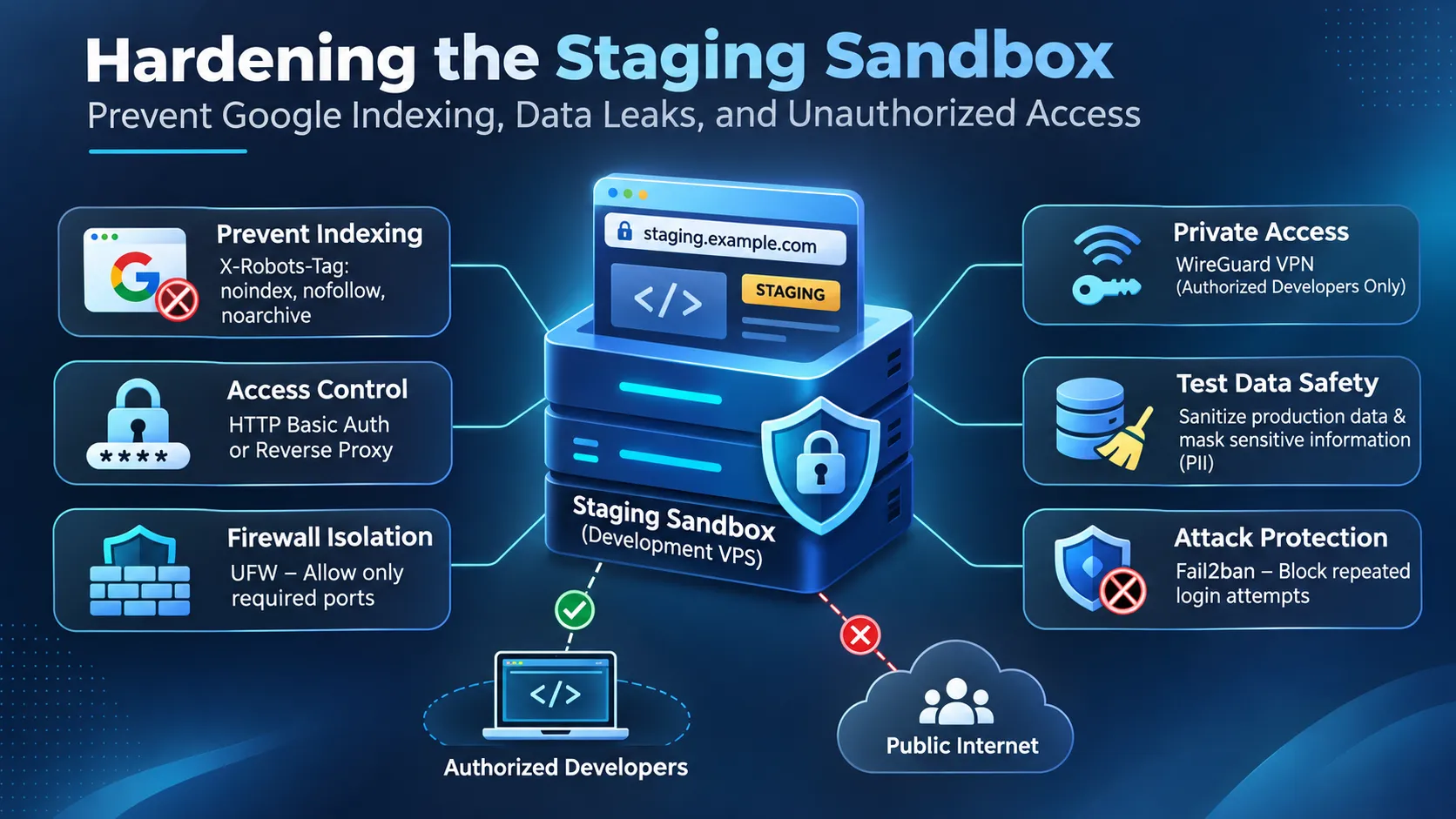

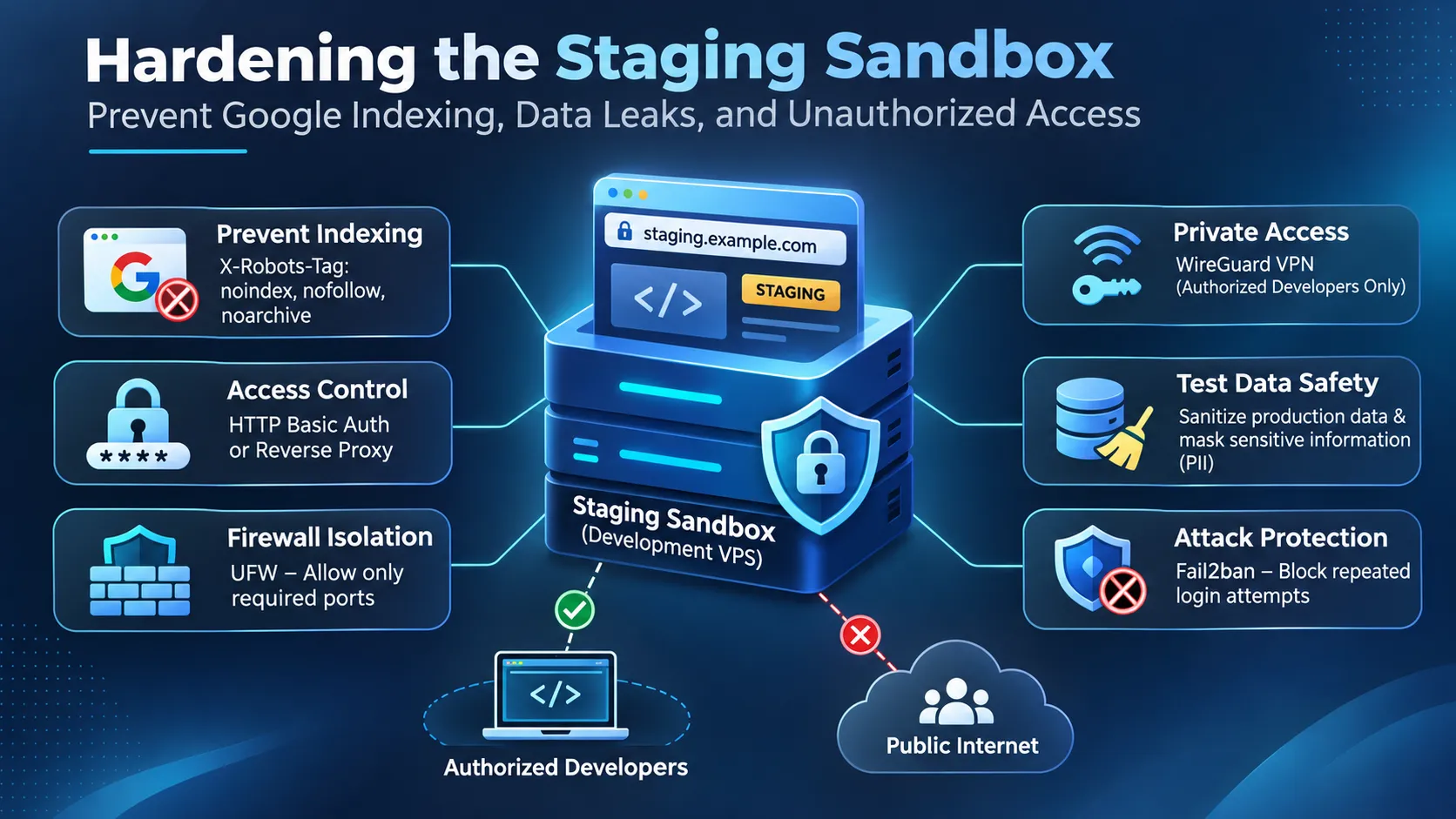
A staging server is supposed to be a private place to test website changes before they reach production. Yet staging environments are sometimes deployed with public URLs, copied customer databases, weak authentication, and default web server settings.
These mistakes can expose unfinished applications, internal information, and sensitive customer records. Search engines may also discover staging pages and display them in search results.
A secure development VPS sandbox needs several layers of protection: restricted network access, authentication, search engine indexing controls, sanitized test data, and careful management of credentials.
This technical runbook explains how to configure those protections on a Linux VPS using Nginx, Caddy, UFW, WireGuard, and Fail2ban.
1. Why Staging Servers Need Separate Security Controls
Production websites usually have established security policies. Development environments often receive less attention because they're considered temporary.
The problem is that a staging server may contain nearly the same application code, database structure, plugins, and configuration files as the production website.
Common staging security risks include:
- Public access to unfinished websites and administrative dashboards.
- Search engines discovering and indexing test pages.
- Customer information copied into development databases.
- Exposed API keys, passwords, and configuration files.
- Unrestricted SSH, database, or application ports.
- Outdated software and plugins used during testing.
A private staging environment should remain accessible to authorized developers without exposing unnecessary services to the public internet.
2. Prevent Google from Indexing Your Staging Sandbox
One of the first tasks when securing a staging website is preventing search engines from indexing its pages.
For example, a staging domain such as staging.example.com might contain a copy of the production website. If it is publicly accessible, Google may discover it through links, sitemaps, or other references.
This can create unwanted search results and duplicate URLs.
Configure X-Robots-Tag in Nginx
The X-Robots-Tag HTTP response header tells compatible search engines how to handle indexing.
Open your staging Nginx configuration:
sudo nano /etc/nginx/sites-available/staging
Inside the appropriate server block, add:
add_header X-Robots-Tag "noindex, nofollow, noarchive" always;
The always parameter helps apply the header to error responses as well as successful responses.
Test the configuration:
sudo nginx -t
Reload Nginx:
sudo systemctl reload nginx
Verify the response header:
curl -I https://staging.example.com
Look for:
X-Robots-Tag: noindex, nofollow, noarchive
Important: A noindex directive is not an access control mechanism. It doesn't stop visitors from opening the website or accessing sensitive information.
Google also needs to crawl an accessible page to discover its noindex instruction. Blocking a page through robots.txt can prevent Google from seeing that instruction.
For confidential staging systems, authentication or network isolation must provide the primary protection.
Configure X-Robots-Tag in Caddy
If your development VPS uses Caddy, you can configure the same indexing directive in its Caddyfile.
staging.example.com {
header X-Robots-Tag "noindex, nofollow, noarchive"
reverse_proxy 127.0.0.1:3000
}
Replace port 3000 with the port used by your development application.
Validate the configuration:
sudo caddy validate --config /etc/caddy/Caddyfile
Reload Caddy:
sudo systemctl reload caddy
Check the response headers using curl -I.
Caddy can automatically manage HTTPS certificates for eligible public domain configurations. Certificate issuance and renewal still depend on the selected challenge method and network accessibility.
3. Restrict Staging Access with HTTP Basic Authentication
Indexing controls alone cannot protect a staging website.
HTTP Basic Authentication adds a login requirement before visitors can access the application.
For Nginx on Ubuntu, install the required utility:
sudo apt update
sudo apt install apache2-utils
Create a password file:
sudo htpasswd -c /etc/nginx/.staging_htpasswd developer
Choose a strong password when prompted.
Protect the file:
sudo chown root:www-data /etc/nginx/.staging_htpasswd
sudo chmod 640 /etc/nginx/.staging_htpasswd
Inside the staging Nginx server block, configure:
auth_basic "Private Staging Environment";
auth_basic_user_file /etc/nginx/.staging_htpasswd;
add_header X-Robots-Tag "noindex, nofollow, noarchive" always;
Test and reload Nginx:
sudo nginx -t
sudo systemctl reload nginx
Visitors should now receive an authentication challenge before accessing the website.
Use HTTPS because HTTP Basic Authentication credentials are not encrypted by the authentication scheme itself.
For Caddy, generate a password hash:
caddy hash-password
Then configure:
staging.example.com {
basic_auth {
developer YOUR_GENERATED_PASSWORD_HASH
}
header X-Robots-Tag "noindex, nofollow, noarchive"
reverse_proxy 127.0.0.1:3000
}
Replace the placeholder with the generated hash.
Basic Authentication is useful for smaller development environments, but it shouldn't replace individual access controls, multifactor authentication, or VPN access when stronger protection is required.
4. Isolate the Development VPS with UFW
A staging server should expose only the network services needed for its operation.
On Ubuntu, UFW provides a straightforward way to manage firewall rules.
Before enabling the firewall, identify your SSH port and ensure that the required administrative access is allowed.
For a server using SSH on port 22:
sudo ufw allow 22/tcp
sudo ufw default deny incoming
sudo ufw default allow outgoing
For a staging website that must remain accessible over HTTPS:
sudo ufw allow 443/tcp
If your staging service requires HTTP for certificate validation or redirects, configure that requirement deliberately rather than leaving unnecessary ports open.
Enable the firewall:
sudo ufw enable
Check the active rules:
sudo ufw status verbose
For stronger isolation, restrict HTTPS to a known office IP address:
sudo ufw delete allow 443/tcp
sudo ufw allow from 203.0.113.10 to any port 443 proto tcp
The address 203.0.113.10 is an example. Replace it with your authorized public IP address.
Before applying restrictive rules, verify that your SSH connection and any cloud-provider firewall rules will continue to permit administration.
If an application listens on port 3000, bind it to 127.0.0.1 when Nginx or Caddy is handling incoming requests. This prevents direct external connections to the application port.
5. Use WireGuard for Private Developer Access
A VPN provides a stronger access boundary for staging systems than relying only on a publicly reachable login page.
WireGuard creates an encrypted network connection between authorized developer devices and the staging VPS.
For example:
- Staging VPN address: 10.0.0.1
- Developer VPN address: 10.0.0.2
- WireGuard UDP port: 51820
- Internal application port: 3000
Install WireGuard:
sudo apt update
sudo apt install wireguard
Generate separate private and public keys for the server and each developer device. Keep private keys confidential.
A minimal server configuration looks like this:
[Interface]
Address = 10.0.0.1/24
ListenPort = 51820
PrivateKey = SERVER_PRIVATE_KEY
[Peer]
PublicKey = CLIENT_PUBLIC_KEY
AllowedIPs = 10.0.0.2/32
Save the completed configuration as:
/etc/wireguard/wg0.conf
Restrict its permissions:
sudo chmod 600 /etc/wireguard/wg0.conf
Allow the VPN connection:
sudo ufw allow 51820/udp
For an application listening on the VPN interface, allow access through WireGuard:
sudo ufw allow in on wg0 to any port 3000 proto tcp
Start the VPN:
sudo systemctl enable --now wg-quick@wg0
Verify its status:
sudo wg show
The developer's client configuration must contain its own private key, the server's public key, the server endpoint, and the appropriate routing settings.
Once the tunnel is established, developers can connect to services through the private VPN address.
Security note: A UFW rule permitting traffic on wg0 doesn't automatically make an application private. The service must also listen on the intended interface, and public firewall rules must not expose the same application port.
6. Sanitize Production Data Before Using It in Staging
Copying a production database directly into staging is one of the most serious development security mistakes.
A test database may contain names, email addresses, addresses, order histories, authentication information, and other personal data.
Even when the staging website is protected by a VPN, unnecessary personal information increases the consequences of a compromised developer account or server.
A safer process is to sanitize data before importing it into the staging environment.
For example, replace customer email addresses with reserved example addresses, remove payment-related information, and replace identifying details with synthetic values.
A simplified SQL example is:
UPDATE customers
SET email = CONCAT('test-', id, '@example.com');
This is only an illustration. Real applications may store personal data across multiple tables, JSON fields, logs, backups, and external services.
A complete sanitization process should also address session tokens, password reset tokens, API credentials, and other sensitive fields.
For WordPress, check user records, form submissions, order data, and plugin-specific tables.
For Magento or Adobe Commerce, review customer accounts, sales records, payment integrations, and transactional email settings.
Keep staging email delivery disabled or redirected to a test mailbox to prevent accidental messages to real customers.
7. Protect Credentials and Environment Files
Development environments often rely on .env files containing database passwords, API tokens, and application secrets.
These files must never be publicly downloadable.
For Nginx, a protective rule can be added inside the relevant server configuration:
location ~ /\.(?!well-known(?:/|$)) {
deny all;
}
This blocks requests to hidden paths such as .env and .git, while allowing requests under /.well-known/.
The rule is defense in depth. Sensitive files should ideally be stored outside the public document root.
Also follow these practices:
- Use separate credentials for staging and production.
- Never copy production API secrets unless absolutely necessary.
- Store sensitive configuration outside public repositories.
- Rotate credentials after suspected exposure.
- Disable production payment and messaging integrations in staging.
- Limit database accounts to the permissions required by the application.
Staging should never have unrestricted access to production databases simply because both environments belong to the same organization.
8. Add Fail2ban and Monitor Access Attempts
Fail2ban can help reduce repeated authentication attacks against services such as SSH.
Install it on Ubuntu:
sudo apt install fail2ban
Create a local configuration file:
sudo nano /etc/fail2ban/jail.d/sshd.local
Add:
[sshd]
enabled = true
port = ssh
backend = systemd
maxretry = 5
findtime = 10m
bantime = 1h
Restart Fail2ban:
sudo systemctl restart fail2ban
Check its status:
sudo fail2ban-client status sshd
This example protects SSH when it uses the standard port. Adjust the configuration for a custom SSH port and verify that the appropriate logs are available.
Fail2ban is an additional security layer, not a replacement for SSH key authentication, timely updates, or network restrictions.
For staging web applications, review Nginx or Caddy access logs and monitor unexpected authentication failures.
9. Data Privacy Requirements for Philippine Organizations
Organizations in the Philippines should consider the Data Privacy Act of 2012, Republic Act No. 10173, when development and staging environments process personal information.
The law and applicable National Privacy Commission requirements make appropriate organizational, physical, and technical safeguards important for systems handling personal data.
Staging environments deserve attention because they may contain copies of customer databases or business records that are outside normal production monitoring.
Practical safeguards include limiting access to authorized developers, using sanitized data wherever possible, keeping access records, protecting backups, and defining procedures for handling suspected data exposure.
The exact legal obligations depend on the organization's role, processing activities, and applicable NPC rules. Technical controls described here support privacy protection but don't establish legal compliance by themselves.
10. Staging Security Verification Checklist
Before allowing developers to use a new staging environment, verify the following:
- HTTPS is configured and functioning correctly.
- Staging access requires authentication or a private VPN.
- Public firewall rules expose only necessary ports.
- X-Robots-Tag directives are configured where appropriate.
- Production customer data has been removed or sanitized.
- Database credentials differ from production.
- .env, .git, and backup files aren't publicly accessible.
- Outbound emails and payment transactions use test services.
- SSH access is restricted and monitored.
- Backups are protected and recovery procedures are tested.
- Former developer accounts and VPN keys have been revoked.
- Access restrictions are tested from an unauthorized network.
For a new deployment, a dedicated development VPS hosting environment can provide a separate place for testing applications. The privacy of that environment still depends on its configuration, access controls, and operational procedures.
Frequently Asked Questions
How do I stop Google from indexing my staging VPS?
Use an X-Robots-Tag: noindex HTTP header on accessible staging pages, and protect confidential environments with authentication or network restrictions. If pages are already indexed, remove the exposure, use the appropriate Google Search Console removal process where eligible, and allow Google to discover the noindex directive when necessary.
Is robots.txt enough to protect a staging website?
No. A robots.txt file gives crawler instructions but doesn't prevent people from visiting the website. It can also stop crawlers from seeing a noindex directive. Private staging systems need real access controls.
Should staging websites use production customer databases?
Avoid using real customer information whenever possible. Use synthetic or properly sanitized datasets, and restrict access to any sensitive information that must be retained for legitimate testing.
Is a VPN necessary for development VPS security?
A VPN isn't mandatory for every staging website, but it's a strong option for internal environments. WireGuard can restrict application access to authenticated devices and reduce exposure to public internet traffic.
Can a staging website cause duplicate content problems?
If a publicly accessible staging copy is indexed, search engines may discover duplicate versions of production content. This can create unwanted URLs and complicate canonical selection. It doesn't automatically mean a duplicate-content penalty.
What is the safest way to configure a staging sandbox?
Start with private network access, individual developer credentials, sanitized test data, restricted firewall rules, separate application secrets, and regular security updates. Add indexing directives as a secondary measure rather than relying on them for confidentiality.
A staging sandbox is ready for development work only after its access controls, data handling, and network exposure have been tested. Keeping it private requires ongoing checks, especially when new services, developers, or application integrations are added.
Conclusion
Securing a development VPS sandbox requires more than hiding it from search engines. A properly protected staging environment should restrict unauthorized access, keep sensitive information private, and prevent test websites from appearing in Google Search results.
Using X-Robots-Tag headers, HTTP Basic Authentication, WireGuard VPN, UFW firewall rules, and Fail2ban helps reduce common staging security risks. Sanitizing test databases, protecting credentials, and separating staging services from production systems provide additional protection.
Regular security checks are equally important. Before deploying new changes, verify access permissions, firewall settings, indexing directives, and database privacy. These practices help developers maintain a secure development VPS sandbox without exposing customer data or unfinished applications.
Responses (0)
Join the conversation
Sign in to share your thoughts and talk with the author.
Sign in to respondNo responses yet. Be the first to share your thoughts!